Roam Research Docs · Help & user documentation
All Pages
markdown version · view in Roam Research
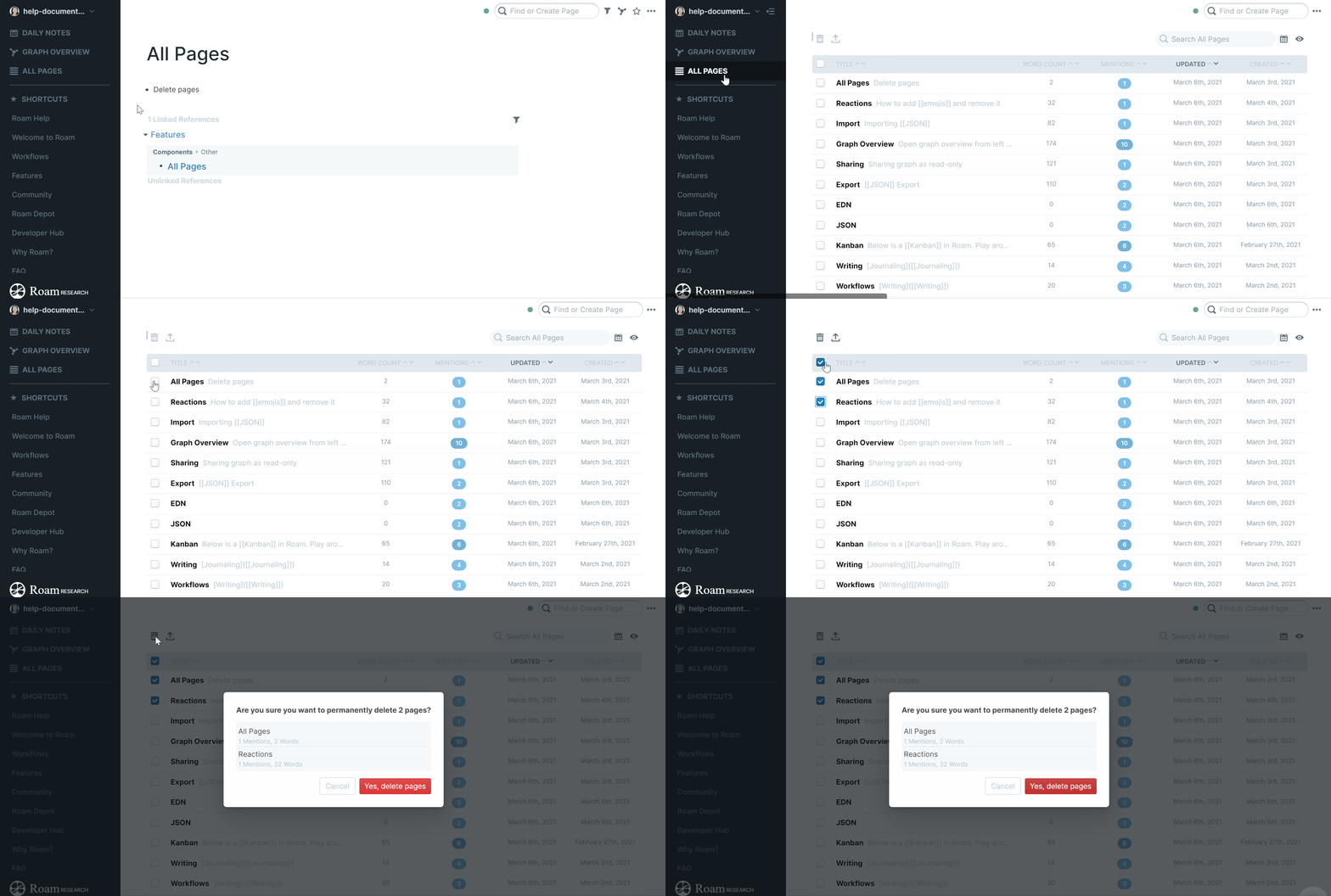
- Every page in your graph in one sortable list, with columns for mentions, word count, and when each page was created and last updated.
- Open it from All Pages in the left sidebar, or run Open all pages from the Command Palette.
Finding and sorting
- Type in the search box to filter the list.
- Sort by title, date updated, date created, mentions, or word count, in either direction.
- Choose which columns to show with Show or Hide Columns, and show or hide daily notes with the calendar toggle.
- Click a page to open it in the main window, or shift-click to open it in the Right Sidebar and keep the list where you are.
Bulk actions
- Tick the checkboxes to select pages. The header checkbox selects everything in the current view.
- Delete Selected Pages and Export Selected Pages act on your whole selection at once.
- Good for cleanup: pages with no content show in italics as Blank, and sorting by word count, smallest to largest, brings them to the top.