Roam Research Docs · Help & user documentation
Roam Depot
markdown version · view in Roam Research
- Roam Depot is Roam's built-in marketplace for extensions: add-ons built by the community that add new features to Roam.
- The Roam team reviews every extension before it's listed or updated.
- Check out the linked references of Roam Depot Extensions for new extensions
Installing extensions
- The marketplace is available in a few places:
- Click Roam Depot in the left sidebar.
- Or open Settings, pick the Roam Depot tab, and click Browse.
- Or run "Roam Depot Marketplace" from the Command Palette.
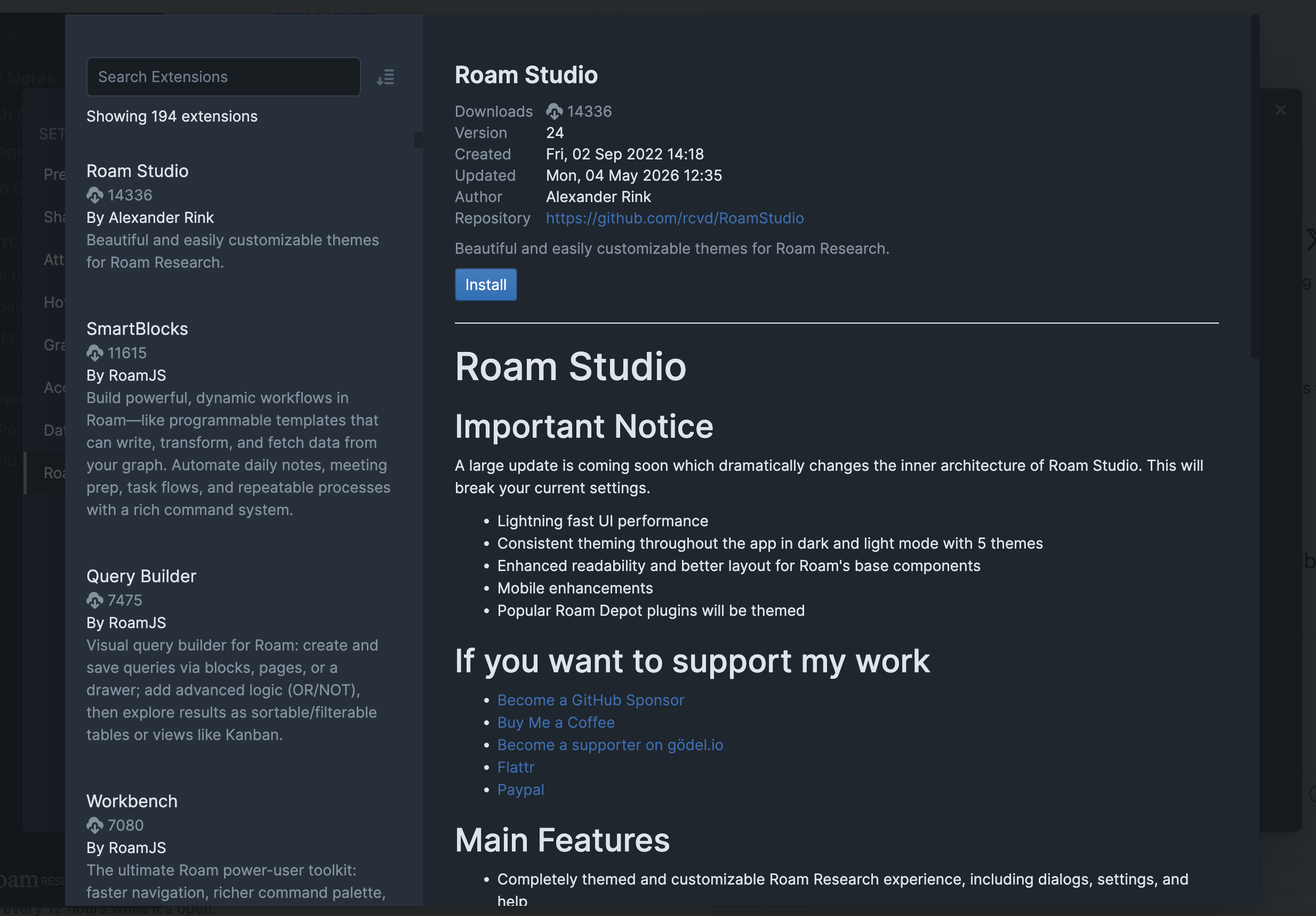
- In the marketplace:
- Search by name, or sort the list by downloads, creation date, last update, or name.
- Click an extension to read its details: description, author, version, download count, and its full README.
- Click Install. The extension starts running right away.
- Extensions are installed per person, per graph: installing one here doesn't add it to your other graphs, or to anyone else's view of this graph.
- To install for everyone on the graph, see Installing for your whole graph
- Installing needs edit access to the graph, so read-only members and visitors to public graphs can't add extensions.
Settings and updates
- An extension with settings gets its own tab in Settings, listed under the Extension Settings heading.
- That tab is also where you set hotkeys for any commands the extension adds.
- Every installed extension has an on/off switch in the Roam Depot tab, so you can turn one off without uninstalling it.
- Updates are automatic: Roam checks for new versions when your graph loads and about every 12 hours while it's open.
- Update all in the Roam Depot tab checks immediately.
Installing for your whole graph
- If you're an admin, the globe button next to an installed extension installs it for everyone you've shared the graph with. ((Public visitors don't get it. due to security concerns))
- Members are asked to confirm before admin-chosen extensions start running for them, and they can opt back out later from the Roam Depot tab.
- Members inherit the extension's configuration and can't change its settings, but they can set their own hotkeys for it.
- Be careful with settings that hold secrets: anything in a shared extension's settings, like an API key, is visible to the people the graph is shared with.
Good to know
- Extensions marked Experimental may cause data loss or other bugs, so keep them away from graphs you care about.
- Some extensions carry a warning that they use javascript eval, which means they can run code that wasn't part of Roam's review. Install those at your own risk.
- For the same reason, these can't be installed for for other users on your graph.
- If Roam starts misbehaving, the Temporarily disable all extensions and css button in the Roam Depot tab reloads with everything off, so you can check whether an extension is the cause.
Building your own
- The guide to building and submitting an extension lives in the developer docs: docs link
- Roam shares a portion of its revenue with extension developers, based on how popular their extensions are.